Jefferson Maps: Local Intelligence at Call Speed
A shared map of practices, specialties, and routes helped Jefferson outreach staff explain nearby care during live calls. It contained no patient information.
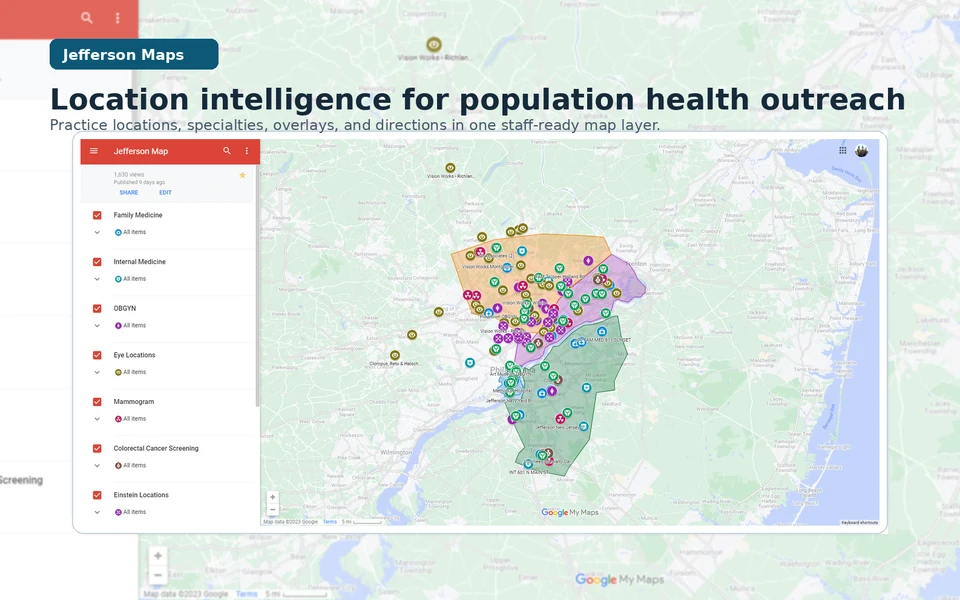
Role
Location intelligence builder and workflow maintainer
Jefferson Health Enterprise Population Health 2023
My role and where the work stands
My role in the work
I identified the local-knowledge dependency, assembled and structured practice and location data, created the map and specialty/overlay system, refined it through staff use, maintained it, and trained a colleague for handoff; outreach coordinators, navigators, practice coaches, and leaders supplied the operating knowledge that made the system useful and carried it into practice.
Where it stands
The no-PHI layer covered at least 61 documented locations and later expanded substantially without a final count being asserted. The combined 2023 process-improvement package that included Jefferson Maps was associated with roughly a 25% increase in call-to-schedule conversion and a movement in no-show complaints from roughly 2–3 per week to roughly 2–3 per month; those signals are not attributed to the map alone.
Contents
The gap appeared during the call
An outreach call at Jefferson Health Enterprise Population Health could turn on one practical question: what nearby care option could a staff member explain clearly enough for a patient to consider? Jefferson Maps gave staff a shared, checkable reference during the call. They could look up practices, specialties, addresses, and routes without depending on a colleague's memory.
I built Jefferson Maps as a spreadsheet-backed location layer that contained no protected health information (PHI). It organized practice and location details such as specialty, address, phone, documented hours, and useful landmarks in Google Maps and Google My Maps, with specialty overlays prepared in QGIS, an open-source geographic information system. Patient data remained in the systems authorized to hold it.
Jefferson Maps brought established ideas from geographic access and patient navigation into a specific operating setting, where research already distinguished the potential availability of nearby care from its actual use and navigation programs helped people work through scheduling and transportation barriers; the project translated that foundation into a no-PHI shared reference joined to live-call verification, maintenance, and handoff.
Guided choice
From a patient need to a guided choice
-
Patient need
Name the practical barrier
Listen for the care gap and the constraint that may stop a willing patient from acting: distance, unfamiliarity, specialty, or a route that is hard to explain.
-
Local intelligence
Verify the care context
Use the shared layer and its underlying sources to check the practice, location, service line, and documented contact details instead of routing from memory alone.
-
Guided choice
Offer a workable next step
Put the verified option into plain language and let the patient choose a path that fits their circumstances; the map supports guidance, not a promise about what a clinic can offer.
A representative call, reconstructed
The exchange below is a representative reconstruction, not a verbatim transcript or a measured before-and-after comparison. It makes the intended operating posture concrete: replace a lookup delay with guidance grounded in a shared location reference. It includes no patient identifiers or PHI.
A representative reconstruction
01 Before the shared layer
Patient Do you have a location near me?
Staff member I’m not familiar with that area. I can look it up and get back to you.
02 With Jefferson Maps
Patient Do you have a location near me?
Staff member I can see two nearby options for that service. Let’s compare the locations and the route that would work better for you.
The reconstruction shows the workflow the shared layer was designed to support; call-level usage logs and a direct linkage between map use and scheduling outcomes were not part of the surviving public record.
Building a shared local reference
The first layer came from practice-directory spreadsheets and public Jefferson location information. I normalized the records, grouped them by specialty, and prepared QGIS overlays that made the footprint easier to scan in Google Maps and Google My Maps. Each entry remained legible: practice name, service line, address, phone or extension, documented hours, practical notes, and a marker that exposed the category without replacing the source detail.
Provider and location verification was part of the workflow. A staff member could check the underlying directory or public location source, notice when a detail needed maintenance, and avoid treating a pin as proof that a service was open or available. The design linked source facts to a human conversation without turning the map into another clinical record.
Evidence folio
Specialty layers and practice footprint
A preserved 2023 specialty and practice-footprint view shows how local knowledge became a shared visual reference. The layer was assembled from practice-directory spreadsheets, public Jefferson location information, and QGIS-created overlays; it contains practice and location information, not patient-level records.
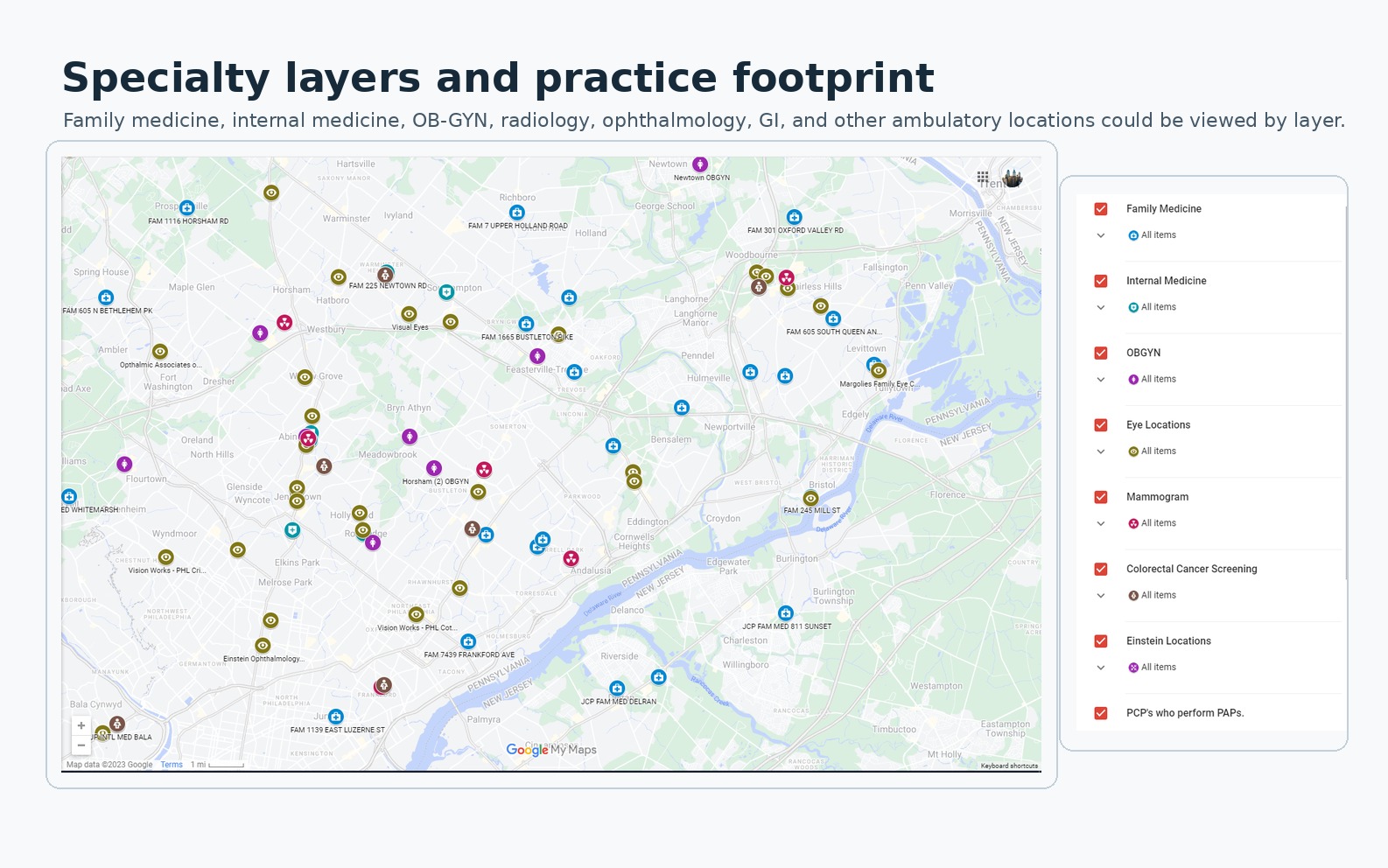
The 2023 view groups practices by specialty. Staff could use the labels, pins, and legend during a call; the map contained no patient records.
The documented layer covered at least 61 locations and later expanded substantially as more ambulatory services and specialties were incorporated. The operating record does not support a final count.
A route is not the same as access
Finding a location raised another question: could staff explain a possible route in ordinary language? The workflow combined location information and directions while staff checked sources and judged what to offer. A route estimate describes potential access. Appointment availability, eligibility, physical accessibility, and transport feasibility still need to be checked during the conversation with the responsible service.
Evidence folio
Transit and directions at call speed
A preserved 2023 directions view pairs Jefferson Maps location information with Google Maps routing and transit details. It shows the information staff could use to explain a nearby option while a call was still live.
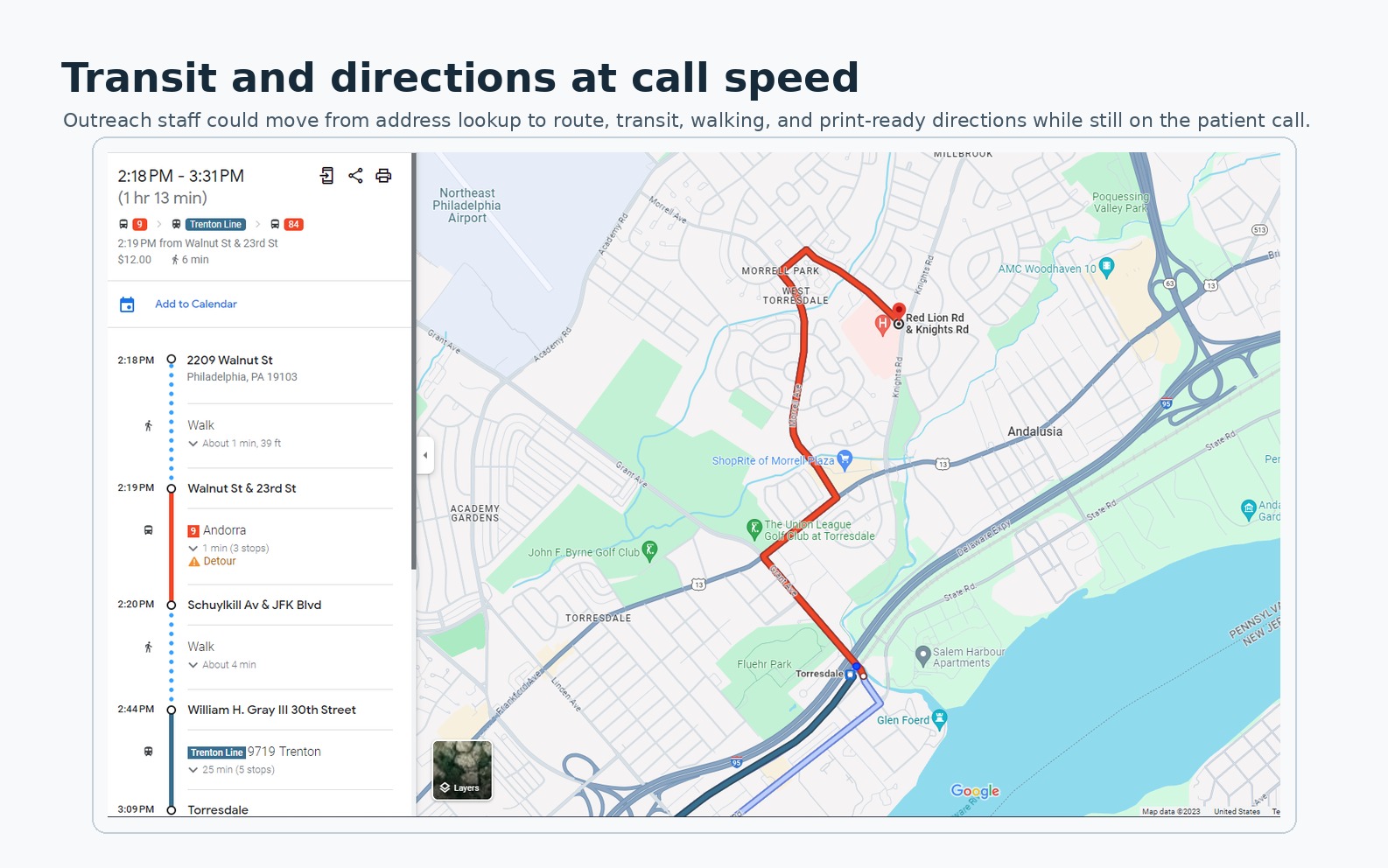
A preserved 2023 route view with the itinerary, walking and transit segments, map line, and surrounding landmarks. Routes and service schedules may have changed.
Maintenance is part of the contribution
Location information drifts as phone numbers change, services move, directory fields are corrected, or ownership becomes unclear. I maintained the layer while I owned the project, then trained a colleague on the maintenance path before handoff. That work was part of the design: without a clear update path, the shared reference would become a second source of misinformation.
The participating outreach coordinators, care navigators, practice coaches, and population-health leaders supplied local operating knowledge and used the shared reference. I owned the system design, data structuring, map and overlay construction, refinement through use, maintenance, and training; they owned the clinical and operational work around it.
Four sources clarify different parts of the work
The preserved map and route images show what staff could see, the reconstructed exchange illustrates intended use, the rounded operating numbers describe the broader process-improvement package, and the literature in the Notes supplies retrospective context; together they explain the operating system while retaining their different evidentiary roles.
What the operating record can support
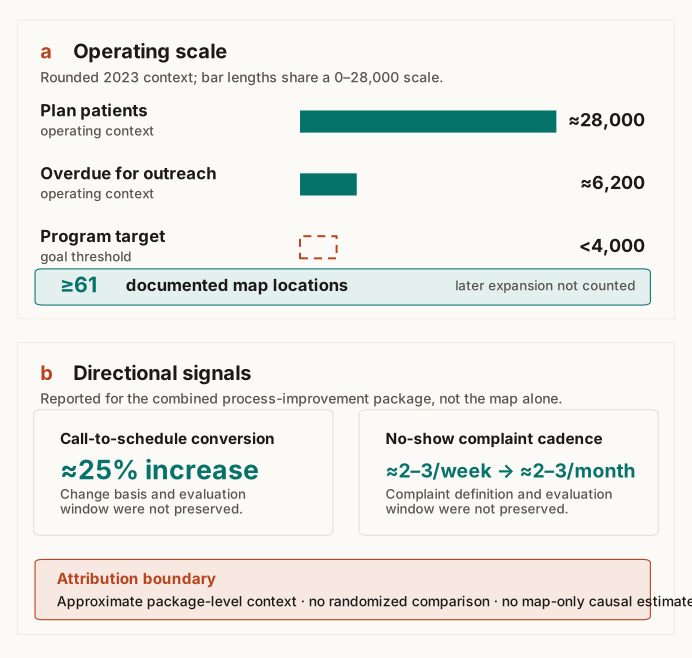
The 2023 record puts the scale of the work in view. Roughly 28,000 plan patients were in the Jefferson system, and roughly 6,200 were overdue for an annual primary-care visit or a three-year Pap measure. The program target was fewer than 4,000 overdue patients, not a reported end state. The map layer covered at least 61 documented locations, then expanded substantially without a final count being preserved.
Evidence boundary
Operating scale and package-level signals
Data table
| Evidence item | Value | Status and scope |
|---|---|---|
| Plan patients | ≈28,000 | Rounded operating context |
| Overdue for outreach | ≈6,200 | Annual primary-care visit or three-year Pap measure |
| Program target | <4,000 | Goal threshold, not a reported end state |
| Documented map locations | ≥61 | Minimum; later expansion had no preserved final count |
| Call-to-schedule conversion | ≈25% increase | Combined package; change basis and evaluation window not preserved |
| No-show complaint cadence | ≈2–3/week to ≈2–3/month | Combined package; definition and evaluation window not preserved |
The combined 2023 process-improvement package that included Jefferson Maps was associated with an approximately 25% increase in call-to-schedule conversion. No-show complaints moved from roughly 2–3 per week to roughly 2–3 per month. The public record does not preserve the exact denominator, evaluation window, whether the conversion change was relative or percentage-point based, or a formal complaint definition. These numbers are therefore directional package-level signals, not a randomized result or a causal estimate for the map layer alone.
The operating loop made the map useful
A map can place a pin; this project concerned what came after, structuring the local facts, keeping patient data elsewhere, verifying the source, explaining a possible next step during the call, and maintaining the reference after handoff.
Jefferson Maps is best understood as maintained local intelligence for a live human conversation, bringing source verification, route context, and active guidance together at call speed.
Notes
These sources provide retrospective public context. They do not verify Jefferson's private workflow, maintenance history, operating numbers, or a map-specific effect.
Guagliardo's review of spatial accessibility in primary care (2004) distinguishes potential access from realized use and cautions against treating a spatial measure as proof of utilization. Kelly and colleagues' systematic review of travel time, distance, and health outcomes (2016) found heterogeneous methods and mixed results across 108 studies.
Nicholson, Hanly, and Celermajer's interactive GIS study (2023) combines geography, demographics, driving time, and candidate clinic locations. Gligoric and colleagues' study of potential and revealed spatial access (2023) separates modeled availability from observed travel. Versace and colleagues' commentary on address-level and travel-time intelligence (2026) postdates the project and is included only as later context.
McBrien and colleagues' systematic review of patient navigators (2018) found improvements in processes of care but substantial variation in program design and uncertainty about active components. The CDC patient-navigation guidance describes navigation as help through barriers and services.
The CDC NCHS transportation brief (2024) and nonfinancial-barriers report (2024) document transportation, appointment, office-hour, and travel-time constraints. They describe the access problem, not this intervention.
Jefferson Health's public locations page shows the institution's current footprint. These sources frame the design problem. The exact 2023 mapped set, contribution history, and approximate conversion and complaint signals come from Jefferson's combined 2023 process-improvement record.